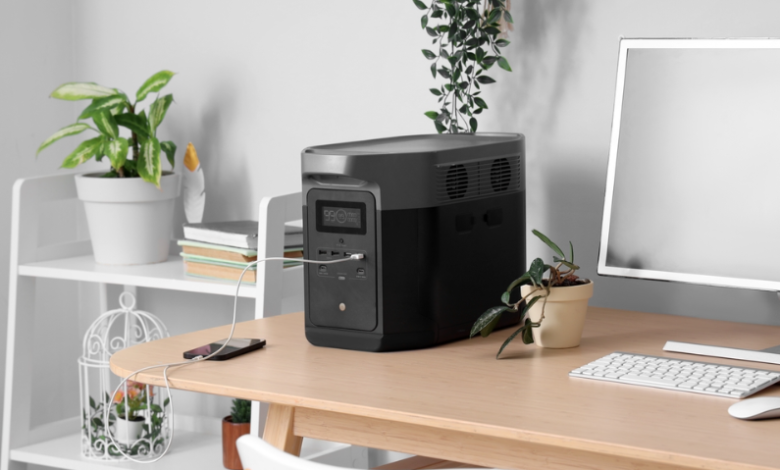
In today’s technology-driven world, power outages can cause significant disruptions to both homes and businesses. From data loss to equipment damage, even a brief interruption can have serious consequences. This is where uninterruptable power supplies (UPS) come into play, providing a reliable and continuous source of power when the main supply fails.
What Are Uninterruptable Power Supplies?
An uninterruptable power supplies is a device designed to provide backup power to electronic devices during power interruptions. It acts as a buffer between your equipment and the main power source, ensuring that devices remain operational in the event of a blackout, voltage fluctuation, or power surge.
UPS systems come in various sizes and capacities, from compact models suitable for personal computers to large-scale units designed for data centers and industrial equipment. The primary function is to maintain the flow of electricity long enough to either save work or safely shut down critical systems.


See also: What is PCBA? Understanding Its Meaning and Importance in Electronics
How Do Uninterruptable Power Supplies Work?
UPS devices generally use batteries or supercapacitors to store energy. When the main power source is functioning normally, the UPS charges its internal battery. When a disruption occurs, the UPS automatically switches to battery mode and supplies power to the connected equipment.
There are three main types of UPS systems:
- Offline/Standby UPS – This is the most basic type. It provides surge protection and battery backup. It switches to battery power when it detects a power failure.
- Line-Interactive UPS – Offers more advanced voltage regulation. It can correct minor power fluctuations without switching to battery, making it suitable for areas with frequent voltage sags and spikes.
- Online/Double-Conversion UPS – Provides continuous, clean power by converting incoming AC power to DC and then back to AC. This ensures zero interruption and is ideal for critical systems such as servers, medical equipment, and data centers.
Benefits of Using Uninterruptable Power Supplies
Investing in a UPS offers several advantages:
- Data Protection: Prevents data loss by giving users time to save files or perform an orderly shutdown.
- Equipment Safety: Protects sensitive electronics from damage caused by voltage fluctuations and surges.
- Business Continuity: Keeps critical systems operational, reducing downtime and potential financial losses.
- Power Quality Improvement: Some UPS units filter out noise and stabilize voltage, improving overall power quality.
Choosing the Right UPS
Selecting a UPS requires consideration of several factors:
- Power Capacity: Determine the total wattage of devices that need protection. The UPS should have a capacity higher than the total load.
- Runtime: Estimate how long you need the UPS to supply power during an outage.
- Form Factor: Consider whether a tower or rack-mounted UPS is more suitable for your space.
- Features: Look for features like LCD displays, automatic voltage regulation, and surge protection based on your requirements.
Maintenance Tips for UPS Systems
To ensure your UPS functions properly, regular maintenance is necessary:
- Test the battery periodically and replace it when it shows signs of deterioration.
- Keep the UPS clean and dust-free.
- Ensure proper ventilation to prevent overheating.
- Monitor software or monitoring tools for real-time performance feedback.
FAQs About Uninterruptable Power Supplies
Q1: How long does a UPS battery last?
The lifespan of a UPS battery typically ranges from 3 to 5 years, depending on usage and environmental conditions.
Q2: Can a UPS protect against all types of power issues?
While UPS units protect against outages, surges, and minor voltage fluctuations, they may not protect against lightning strikes or extremely high-voltage events.
Q3: Is a UPS necessary for home use?
Yes, especially if you have critical devices like computers, home servers, or medical equipment that require continuous power.
Q4: Can I use a UPS with multiple devices?
Yes, but ensure the total load does not exceed the UPS’s rated capacity to prevent overload and possible damage.
Q5: How do I know if my UPS is functioning properly?
Most UPS devices have LED indicators or LCD screens showing battery status, load capacity, and warnings if there’s an issue. Regular testing is recommended.
Conclusion
Uninterruptable power supplies are essential for maintaining power continuity and protecting valuable electronic devices. Whether for personal use, business, or industrial applications, investing in a UPS ensures that power interruptions do not lead to data loss, equipment damage, or costly downtime. By understanding the types, benefits, and maintenance of UPS systems, users can make informed decisions to safeguard their technology infrastructure.